
User Logs
Overview
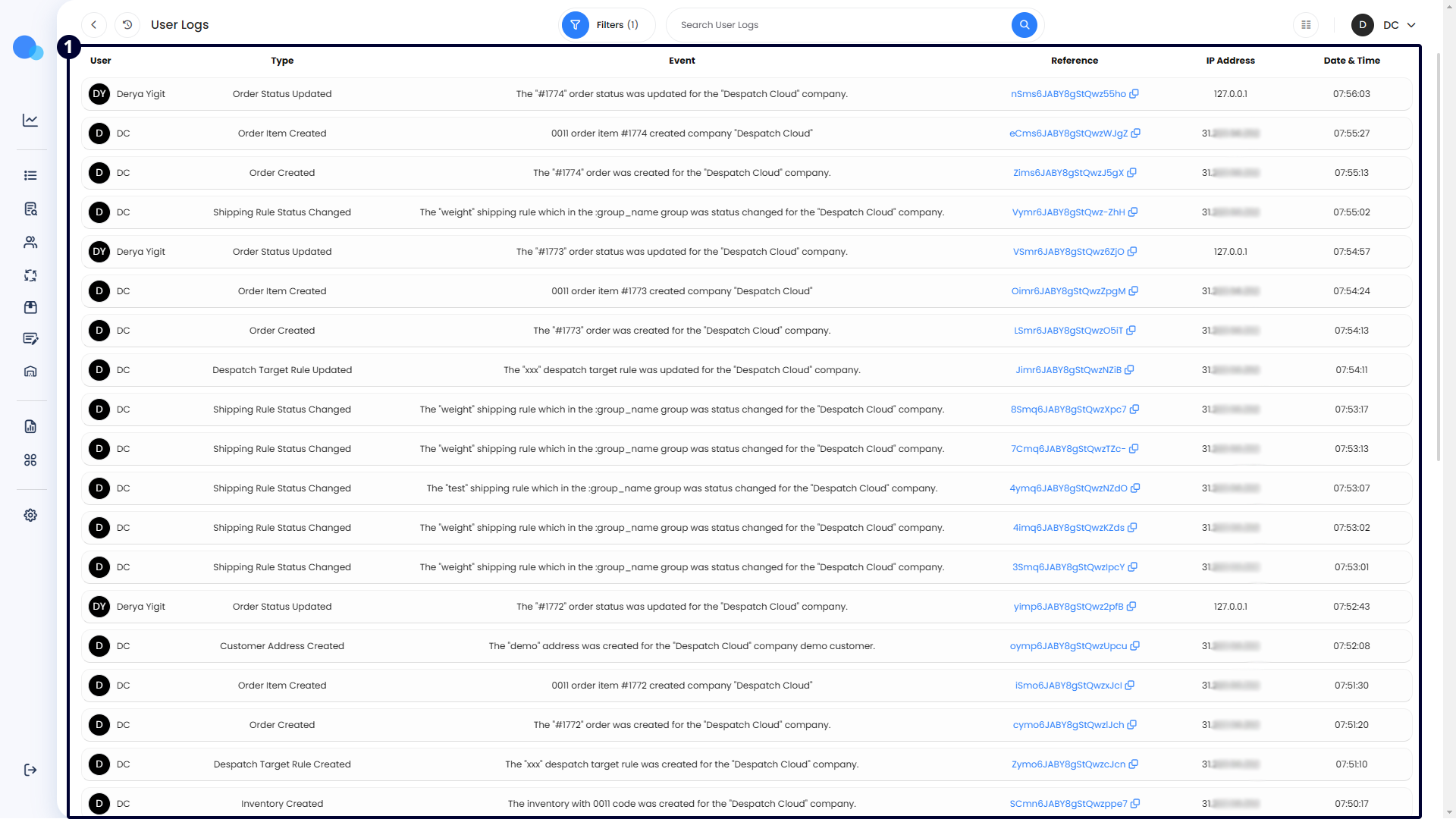
The User Logs page allows you to view the history of user actions on your platform. Each action is assigned a unique ID, which can be copied and shared with our support team in case of an error. You can filter and search for entries using various options such as action type, IP address, user who performed the action, and date filters. Please refer to our dedicated documentation for detailed information on using the filters and search bar.
Accessing User Logs
To access the user logs page, click on the settings icon on the left-hand side of the screen. Then, select the "User Logs" option, as shown in the highlighted picture below.

Managing User Logs
Data will be listed here as the users in your platform take action. They are listed from the newest to the oldest. The columns are explained below:
- User: The name of the user who took the action.
- Type: This explains the name of the action taken in a short way. The descriptions of each action type are as follows:
- Switched: The user changed from one account or profile to another.
- Unlinked: The user disconnected a linked account or integration.
- Transferred: The user moved data or ownership from one entity to another.
- Accepted Invitation: The user accepted an invitation to join a team or platform.
- Rejected Invitation: The user declined an invitation to join a team or platform.
- User Create: A new user account was created.
- User Update: An existing user account was updated.
- User Delete: A user account was deleted.
- User Status Change: The status of a user account was changed (e.g., activated or deactivated).
- Company Created: A new company profile was created.
- Company Info Updated: The information for a company profile was updated.
- Company Deleted: A company profile was deleted.
- Updated Access Time: The access time for a user or system was updated.
- Updated Currency Setting: The currency settings were updated.
- Removed Currency Setting: A currency setting was removed.
- Email Template Created: A new email template was created.
- Email Template Updated: An existing email template was updated.
- Email Template Deleted: An email template was deleted.
- Email Template Test Mail Sent: A test email was sent using an email template.
- Print Template Created: A new print template was created.
- Print Template Updated: An existing print template was updated.
- Print Template Duplicated: An existing print template was duplicated.
- Print Template Deleted: A print template was deleted.
- Courier API Request Log: Logged an API request to a courier service.
- Courier List: Retrieved a list of available couriers.
- Courier Async API Request Log: Logged an asynchronous API request to a courier service.
- Shipping API User Created: A new user for the shipping API was created.
- Get Preset List: Retrieved a list of shipping presets.
- Get Registration Field List: Retrieved a list of registration fields.
- Get Specifics Field List: Retrieved a list of specifics fields.
- Shipping Register Auth: Registered authentication for shipping.
- Shipping Update Auth: Updated authentication for shipping.
- Shipping Delete Auth: Deleted authentication for shipping.
- Shipping Create Shipment: Created a shipment.
- Shipping Bulk Create Shipment: Created multiple shipments in bulk.
- Shipping Create Manifest: Created a shipping manifest.
- Shipping Get Webhooks: Retrieved webhook settings for shipping.
- Shipping Cancel Label: Cancelled a shipping label.
- Shipping Regenerate Shipment File URL: Regenerated the file URL for a shipment.
- Label Format Changed: Changed the format of a shipping label.
- Add Courier Service: Added a new courier service.
- Get Courier Service: Retrieved details of a courier service.
- Update Presets: Updated shipping presets.
- Inventory Created: Created new inventory records.
- Inventory Deleted: Deleted inventory records.
- Inventory Archived: Archived inventory records.
- Inventory Restored: Restored archived inventory records.
- Barcode Created: Created a new barcode.
- Barcode Deleted: Deleted a barcode.
- Barcode Updated: Updated a barcode.
- Category Created: Created a new category.
- Category Updated: Updated an existing category.
- Category Deleted: Deleted a category.
- Inventory Tag Created: Created a new inventory tag.
- Inventory Tag Deleted: Deleted an inventory tag.
- Created Shelf: Created a new shelf for inventory storage.
- Deleted Shelf: Deleted an existing shelf.
- Updated Shelf: Updated an existing shelf.
- Created Warehouse: Created a new warehouse.
- Deleted Warehouse: Deleted an existing warehouse.
- Updated Warehouse: Updated an existing warehouse.
- Created Zone: Created a new zone within a warehouse.
- Deleted Zone: Deleted an existing zone.
- Updated Zone: Updated an existing zone.
- Created Location: Created a new location within a warehouse.
- Updated Location: Updated an existing location.
- Deleted Location: Deleted an existing location.
- Copied Location: Duplicated an existing location.
- Created Location Category: Created a new location category.
- Updated Location Category: Updated an existing location category.
- Deleted Location Category: Deleted an existing location category.
- Created Warehouse Contact: Added a new warehouse contact.
- Updated Warehouse Contact: Updated an existing warehouse contact.
- Deleted Warehouse Contact: Deleted a warehouse contact.
- Created Pick Routine: Created a new pick routine.
- Deleted Pick Routine: Deleted an existing pick routine.
- Updated Pick Routine: Updated an existing pick routine.
- Created Pick Routine Template: Created a new pick routine template.
- Deleted Pick Routine Template: Deleted an existing pick routine template.
- Updated Pick Routine Template: Updated an existing pick routine template.
- Re-Sorted Pick Routine Template: Re-sorted a pick routine template.
- Pick Created: Created a new pick list.
- Pick Updated: Updated an existing pick list.
- Pick Deleted: Deleted a pick list.
- Pick Archived: Archived a pick list.
- Pick Item Picked Quantity Updated: Updated the picked quantity for an item in a pick list.
- Pick Item Action Quantity Updated: Updated the action quantity for an item in a pick list.
- Pick Item Action Quantity Removed: Removed the action quantity for an item in a pick list.
- Pick Item Skipped: Marked an item in a pick list as skipped.
- Pick Item Location Changed: Changed the location of an item in a pick list.
- Pick Item Deleted: Deleted an item from a pick list.
- Pick Item Split: Split an item in a pick list into multiple parts.
- Pick Tag Created: Created a new tag for a pick list.
- Pick Tag Deleted: Deleted a tag from a pick list.
- Customer Created: Created a new customer profile.
- Customer Updated: Updated an existing customer profile.
- Customer Deleted: Deleted a customer profile.
- Customer Archived: Archived a customer profile.
- Customer Contact Created: Created a new customer contact.
- Customer Contact Updated: Updated an existing customer contact.
- Customer Contact Deleted: Deleted a customer contact.
- Customer Contact Archived: Archived a customer contact.
- Customer Address Created: Added a new customer address.
- Customer Address Updated: Updated an existing customer address.
- Customer Address Deleted: Deleted a customer address.
- Customer Address Archived: Archived a customer address.
- Customer Tag Created: Created a new customer tag.
- Customer Tag Deleted: Deleted a customer tag.
- Customer Note Created: Added a new note to a customer profile.
- Customer Note Deleted: Deleted a note from a customer profile.
- Order Tag Created: Added a new tag to an order.
- Order Tag Deleted: Deleted a tag from an order.
- Order Created: Created a new order.
- Order Updated: Updated an existing order.
- Order Folder Created: Created a new order folder.
- Order Folder Updated: Updated an existing order folder.
- Order Folder Deleted: Deleted an order folder.
- Order Folder Copied: Duplicated an order folder.
- Order Folder Merged: Merged two or more order folders.
- Order Folder Tag Created: Added a new tag to an order folder.
- Order Folder Tag Updated: Updated an existing tag on an order folder.
- Order Folder Tag Deleted: Deleted a tag from an order folder.
- Order Status Updated: Updated the status of an order.
- Order Deleted: Deleted an order.
- Order Archived: Archived an order.
- Order Unarchived: Unarchived an order.
- Order Item Created: Added a new item to an order.
- Order Item Updated: Updated an existing item in an order.
- Order Item Deleted: Deleted an item from an order.
- Order Comment Created: Added a new comment to an order.
- Order Comment Updated: Updated an existing comment on an order.
- Order Comment Deleted: Deleted a comment from an order.
- Order Attachment Created: Added a new attachment to an order.
- Order Attachment Deleted: Deleted an attachment from an order.
- Notification Created: Created a new notification.
- Notification Updated: Updated an existing notification.
- Notification Deleted: Deleted a notification.
- Notification Status Changed: Changed the status of a notification.
- Notification Re-Send: Resent a notification.
- Mail Account Setting Created: Created a new mail account setting.
- Mail Account Setting Updated: Updated an existing mail account setting.
- Mail Account Setting Deleted: Deleted a mail account setting.
- Mail Account Setting Status Changed: Changed the status of a mail account setting.
- Log: An entry of a log action.
- Store Created: Created a new store.
- Store Updated: Updated an existing store.
- Store Deleted: Deleted a store.
- Store Address Updated: Updated the address of a store.
- Channel Created: Created a new sales channel.
- Channel Updated: Updated an existing sales channel.
- Channel Deleted: Deleted a sales channel.
- Shipping Rule Configuration Created: Created a new shipping rule configuration.
- Shipping Rule Configuration Updated: Updated an existing shipping rule configuration.
- Shipping Rule Group Created: Created a new shipping rule group.
- Shipping Rule Group Updated: Updated an existing shipping rule group.
- Shipping Rule Group Deleted: Deleted a shipping rule group.
- Shipping Rule Group Status Changed: Changed the status of a shipping rule group.
- Shipping Rule Group Sorted: Sorted a shipping rule group.
- Shipping Rule Group Duplicated: Duplicated a shipping rule group.
- Shipping Rule Created: Created a new shipping rule.
- Shipping Rule Updated: Updated an existing shipping rule.
- Shipping Rule Deleted: Deleted a shipping rule.
- Shipping Rule Status Changed: Changed the status of a shipping rule.
- Shipping Rule Sorted: Sorted a shipping rule.
- Tax Group Created: Created a new tax group.
- Tax Group Updated: Updated an existing tax group.
- Tax Group Deleted: Deleted a tax group.
- Tax Group Status Changed: Changed the status of a tax group.
- System Default Created: Created a new system default.
- System Default Updated: Updated an existing system default.
- System Default Deleted: Deleted a system default.
- Shipment Package Template Created: Created a new shipment package template.
- Shipment Package Template Updated: Updated an existing shipment package template.
- Shipment Package Template Deleted: Deleted a shipment package template.
- Shipment Package Template Duplicated: Duplicated a shipment package template.
- Inventory Linking Attached: Attached an inventory linking.
- Inventory Linking Detached: Detached an inventory linking.
- Rule Engine Created: Created a new rule engine.
- Rule Engine Updated: Updated an existing rule engine.
- Rule Engine Deleted: Deleted a rule engine.
- Rule Engine Status Changed: Changed the status of a rule engine.
- Rule Engine Sorted: Sorted a rule engine.
- Rule Engine Duplicated: Duplicated a rule engine.
- Rule Engine Ran: Ran a rule engine.
- Rule Engine Tested: Tested a rule engine.
- File Uploaded: Uploaded a file.
- Job Retry: Retried a job.
- Job Cancelled: Cancelled a job.
- Printing Queue Created: Created a new printing queue.
- Printing Queue Status Changed: Changed the status of a printing queue.
- Printing Queue Retried: Retried a printing queue.
- Supplier Created: Created a new supplier profile.
- Supplier Updated: Updated an existing supplier profile.
- Supplier Deleted: Deleted a supplier profile.
- Supplier Archived: Archived a supplier profile.
- Supplier Contact Created: Created a new supplier contact.
- Supplier Contact Updated: Updated an existing supplier contact.
- Supplier Contact Deleted: Deleted a supplier contact.
- Supplier Contact Archived: Archived a supplier contact.
- Supplier Address Created: Created a new supplier address.
- Supplier Address Updated: Updated an existing supplier address.
- Supplier Address Deleted: Deleted a supplier address.
- Supplier Address Archived: Archived a supplier address.
- Supplier Tag Created: Created a new supplier tag.
- Supplier Tag Updated: Updated an existing supplier tag.
- Supplier Tag Deleted: Deleted a supplier tag.
- Supplier Tag Archived: Archived a supplier tag.
- Supplier Note Created: Created a new note for a supplier profile.
- Supplier Note Deleted: Deleted a note from a supplier profile.
- Delivery Created: Created a new delivery record.
- Delivery Updated: Updated an existing delivery record.
- Delivery Deleted: Deleted a delivery record.
- Delivery Archived: Archived a delivery record.
- Delivery Unarchived: Unarchived a delivery record.
- Delivery Published: Published a delivery record.
- Delivery Item Created: Added a new item to a delivery record.
- Delivery Item Deleted: Deleted an item from a delivery record.
- Delivery Item Location Updated: Updated the location of an item in a delivery record.
- Delivery Item Action Qty Updated: Updated the action quantity for an item in a delivery record.
- Delivery Size Created: Created a new delivery size.
- Delivery Size Updated: Updated an existing delivery size.
- Delivery Size Deleted: Deleted a delivery size.
- Delivery Assigned User Created: Assigned a user to a delivery record.
- Delivery User Time Tracking Started: Started time tracking for a user on a delivery record.
- Delivery User Time Tracking Stopped: Stopped time tracking for a user on a delivery record.
- Delivery Attachment Created: Added a new attachment to a delivery record.
- Delivery Attachment Updated: Updated an existing attachment on a delivery record.
- Delivery Attachment Deleted: Deleted an attachment from a delivery record.
- Delivery Tag Created: Created a new tag for a delivery record.
- Delivery Tag Deleted: Deleted a tag from a delivery record.
- Delivery Expected Date Updated: Updated the expected date for a delivery record.
- Despatch Target Rule Created: Created a new despatch target rule.
- Despatch Target Rule Updated: Updated an existing despatch target rule.
- Despatch Target Rule Deleted: Deleted a despatch target rule.
- Despatch Target Rule Sorted: Sorted a despatch target rule.
- Despatch Target Rule Duplicated: Duplicated a despatch target rule.
- Despatch Target Rule Status Changed: Changed the status of a despatch target rule.
- Despatch Target Rule Ran: Ran a despatch target rule.
- Global System Notification Snoozed: Snoozed a global system notification.
- Document Rule Created: Created a new document rule.
- Document Rule Updated: Updated an existing document rule.
- Document Rule Deleted: Deleted a document rule.
- Document Rule Status Changed: Changed the status of a document rule.
- Document Rule Sorted: Sorted a document rule.
- Document Rule Duplicated: Duplicated a document rule.
- Document Rule Ran: Ran a document rule.
- Supplier Purchasing Settings Updated: Updated purchasing settings for a supplier.
- Customer Merged: Merged customer profiles.
- Purchase Order Created: Created a new purchase order.
- Purchase Order Duplicated: Duplicated an existing purchase order.
- Purchase Order Canceled: Canceled a purchase order.
- Purchase Order Sent to Supplier: Sent a purchase order to a supplier.
- Purchase Order Drafted: Drafted a purchase order.
- Purchase Order Deleted: Deleted a purchase order.
- Purchase Order Paid Amount Updated: Updated the paid amount for a purchase order.
- Purchase Order Total Amount Updated: Updated the total amount for a purchase order.
- Purchase Order Archived: Archived a purchase order.
- Purchase Order Address Updated: Updated the address on a purchase order.
- Purchase Order Tag Created: Created a new tag for a purchase order.
- Purchase Order Tag Deleted: Deleted a tag from a purchase order.
- Purchase Order Item Created: Added a new item to a purchase order.
- Purchase Order Updated: Updated an existing purchase order.
- Purchase Order Item Deleted: Deleted an item from a purchase order.
- Report Created: Created a new report.
- Report Updated: Updated an existing report.
- Report Deleted: Deleted a report.
- Report Exported: Exported a report.
- Channel Print Template Updated: Updated a print template for a channel.
- Rule Engine Conditions Saved: Saved conditions for a rule engine.
- Rule Engine Conditions Deleted: Deleted conditions for a rule engine.
- Rule Engine Conditions Restored: Restored conditions for a rule engine.
- Despatch Target Rule Conditions Saved: Saved conditions for a despatch target rule.
- Despatch Target Rule Conditions Deleted: Deleted conditions for a despatch target rule.
- Despatch Target Rule Conditions Restored: Restored conditions for a despatch target rule.
- Document Rule Conditions Saved: Saved conditions for a document rule.
- Document Rule Conditions Deleted: Deleted conditions for a document rule.
- Document Rule Conditions Restored: Restored conditions for a document rule.
- Shipping Engine Conditions Saved: Saved conditions for a shipping engine.
- Shipping Engine Conditions Deleted: Deleted conditions for a shipping engine.
- Shipping Engine Conditions Restored: Restored conditions for a shipping engine.
- Notification Conditions Saved: Saved conditions for a notification.
- Notification Conditions Deleted: Deleted conditions for a notification.
- Notification Conditions Restored: Restored conditions for a notification.
- Event: This column provides detailed information about the action taken.
- Reference: The system assigns unique IDs to each action. Clicking on the reference IDs copies them, which helps report issues with logged actions to support.
- IP Address: This shows the IP address of the user who performed the action.
- Date & Time: Displays the date and time when the action was taken.
No Comments